


Remote firmware upgrades are becoming an increasingly important feature in modern energy storage and industrial power systems.
For installers, however, simply having a “remote firmware upgrade” function does not necessarily mean that the system is easy or safe to maintain.
A firmware update can affect communication, monitoring, protection logic, control functions, and compatibility between different system components. If the upgrade process is poorly designed, a routine software update may require an unexpected site visit or even cause equipment downtime.
For this reason, installers should evaluate remote firmware upgrade capability before commissioning an energy storage system.
The key question is not simply:
“Can the system be upgraded remotely?”
It is:
“Can firmware be upgraded remotely, securely, controllably, and with a reliable recovery process?”
What Is a Remote Firmware Upgrade?
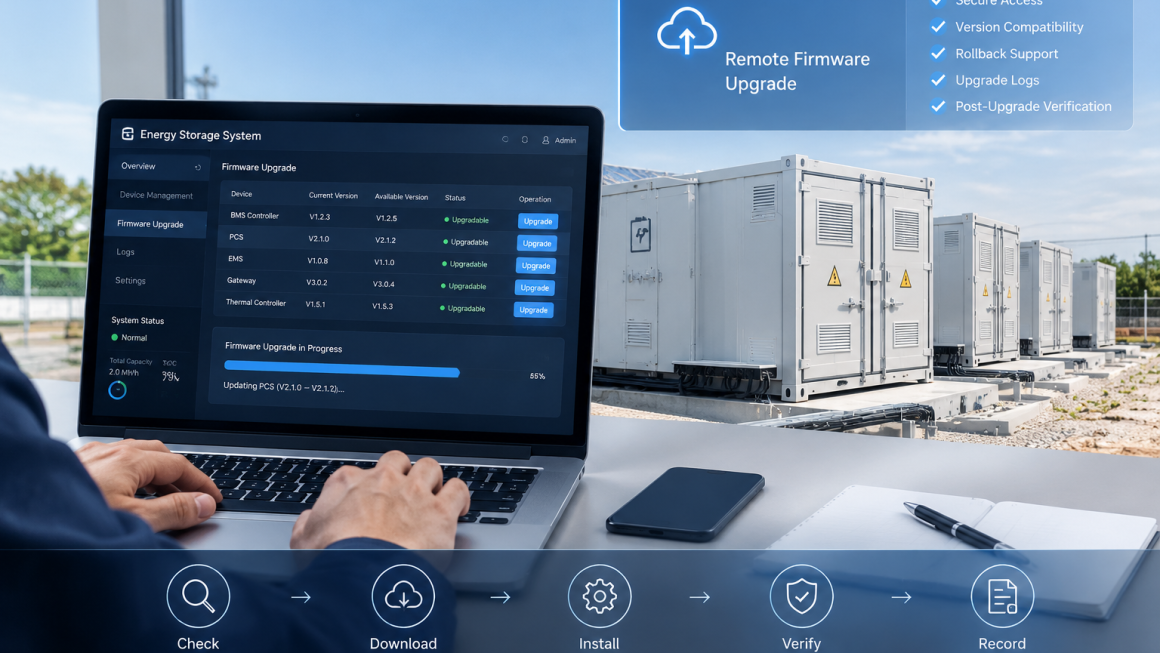
Remote firmware upgrade, sometimes called FOTA (Firmware Over-the-Air), allows authorized users or service teams to update device firmware without physically visiting the installation site.
Depending on the system architecture, remotely upgradeable devices may include:
- Battery management controllers
- Power conversion equipment
- Energy management controllers
- Communication gateways
- Monitoring devices
- Thermal management controllers
- Protection devices
- Industrial networking equipment
The exact scope depends on the manufacturer’s system architecture.
For installers, remote upgrade capability can reduce the number of unnecessary service visits and make long-term maintenance more efficient.
However, it also introduces additional cybersecurity and operational considerations.
Why Remote Firmware Upgrades Matter for Installers
An energy storage installation may operate for many years.
During this period, manufacturers may release firmware updates to address:
- Software bugs
- Communication problems
- Device compatibility
- Performance improvements
- Monitoring functions
- Security vulnerabilities
- New operating requirements
- Control-system improvements
Without remote access, every firmware update may require a technician to travel to the site.
For systems installed across multiple industrial parks, commercial buildings, or remote facilities, this can create significant O&M costs.
Remote firmware upgrades can potentially reduce:
- Travel costs
- Technician hours
- Downtime
- Scheduling delays
- Emergency service requirements
However, these benefits depend heavily on the quality of the upgrade mechanism.
1. Check Which Devices Can Be Upgraded Remotely
The first question installers should ask is:
Which components actually support remote firmware upgrades?
A system may advertise remote firmware capability while only supporting updates for selected devices.
Installers should identify whether remote updates are available for:
- Gateway
- Controller
- BMS
- PCS
- EMS
- Communication modules
- Environmental monitoring equipment
- Protection controllers
A clear firmware architecture should show which devices can be updated independently and which require coordinated updates.
This is important because compatibility between different firmware versions can affect system operation.
2. Check Whether Firmware Compatibility Is Managed
Modern energy storage systems may contain multiple controllers from different manufacturers.
A firmware update for one component may affect its communication with another component.
For example:
BMS firmware → Communication gateway → EMS → Monitoring platform
If one component is updated while another remains on an incompatible version, communication problems may occur.
Installers should therefore check whether the manufacturer provides:
- Supported firmware combinations
- Version compatibility tables
- Upgrade sequences
- Release notes
- Rollback procedures
- Minimum hardware requirements
A good remote upgrade system should not simply push the newest firmware to every device.
It should first determine whether the target configuration is supported.
3. Check Authentication and Access Control
Remote firmware updates create a potential cybersecurity entry point.
Installers should determine how firmware updates are authorized.
Important questions include:
- Who can initiate an upgrade?
- Is user authentication required?
- Are different user roles supported?
- Is administrator approval required?
- Are update permissions logged?
- Can unauthorized firmware be installed?
- Can access be revoked when a project changes ownership?
For industrial energy systems, access control should be treated as part of the overall O&M strategy rather than simply a software feature.
4. Check Firmware Authenticity
A remote update system should provide a mechanism to verify that the firmware package comes from an authorized source.
Installers should ask whether the system uses measures such as:
- Digital signatures
- Firmware integrity verification
- Package authentication
- Secure download channels
- Version verification
The objective is straightforward:
The system should install only authorized and valid firmware.
This is particularly important for remotely connected industrial equipment.
5. Check Whether the System Supports Rollback
One of the most important questions is:
What happens if a firmware upgrade fails?
Potential problems can include:
- Communication interruption
- Power loss during the upgrade
- Incompatible firmware
- Network interruption
- Corrupted firmware package
- Device restart failure
A robust system should have a defined recovery mechanism.
Installers should determine whether the device supports:
- Automatic rollback
- Previous-version recovery
- Safe-mode operation
- Local recovery
- Redundant firmware partitions
- Manual recovery procedures
Remote upgrade capability is much more useful when a failed update does not automatically become a site emergency.
6. Check What Happens During Power or Network Loss
Remote upgrades depend on communication and power availability.
Installers should ask:
What happens if the network connection is interrupted halfway through an upgrade?
And:
What happens if the equipment loses power during the update?
A reliable system should have a documented behavior for these situations.
Possible mechanisms include:
- Download first, install second
- Package integrity verification
- Resume capability
- Automatic retry
- Rollback
- Recovery mode
The installer should understand the actual process before relying on remote updates for field maintenance.
7. Check Whether the Upgrade Requires System Downtime
Not every firmware upgrade can be performed while the system continues operating normally.
Some updates may require:
- Controller restart
- Communication restart
- PCS shutdown
- Battery system shutdown
- Temporary loss of monitoring
- Temporary loss of remote control
Installers should therefore determine:
Can the update be performed online, or does it require a maintenance window?
If downtime is required, the procedure should define:
- Pre-update checks
- Customer notification
- System shutdown
- Firmware installation
- Restart
- Functional verification
- Communication verification
- Return to normal operation
This is especially important for industrial facilities where unexpected downtime may affect production.
8. Check Whether Updates Can Be Scheduled
A remote upgrade system is more useful when installers can control when an update occurs.
For industrial and commercial energy storage systems, updates should ideally be scheduled during appropriate maintenance windows.
Installers should check whether the platform supports:
- Scheduled updates
- Maintenance windows
- Remote approval
- Batch upgrades
- Automatic retry
- Upgrade status notifications
This prevents a firmware update from unexpectedly occurring during a critical operating period.
9. Check Firmware Version Visibility
Installers need to know exactly what firmware is installed.
The monitoring platform should ideally display:
- Device model
- Serial number
- Current firmware version
- Available firmware version
- Upgrade status
- Upgrade history
- Upgrade time
- Upgrade result
This information can significantly simplify troubleshooting.
For example, if several systems have a communication problem, the installer can compare their firmware versions before sending a technician to the site.
10. Check Upgrade Logs
A professional O&M system should maintain a record of firmware changes.
An upgrade log may include:
- Device identification
- Previous firmware version
- New firmware version
- Upgrade date
- Upgrade operator
- Upgrade result
- Error information
- Rollback status
This creates a useful maintenance history.
It can also help distinguish between a hardware problem and a software configuration problem.
11. Check Whether Multiple Devices Can Be Updated in a Controlled Sequence
Large energy storage installations may contain many similar devices.
Updating all devices simultaneously may create unnecessary risk.
Installers should ask whether the system supports staged deployment.
For example:
Test device → Small group → Larger group → Full system
This approach can help identify unexpected compatibility problems before the update reaches every device.
For multi-site installations, a similar strategy can be used:
Pilot site → Limited number of sites → Wider deployment
This is particularly useful when a firmware update affects a large installed base.
12. Check Post-Upgrade Verification
Installing firmware is not the final step.
The system should be checked after the upgrade.
Typical verification may include:
Communication
Is the device communicating correctly with the gateway and monitoring platform?
Control
Can authorized users still issue the expected commands?
Monitoring
Are voltage, temperature, status, alarms, and other data displayed correctly?
Protection
Are relevant protection and alarm functions operating normally?
System Integration
Are communication links between BMS, PCS, EMS, and other relevant components functioning as expected?
The exact verification procedure should follow the manufacturer’s instructions and the system’s safety requirements.
13. Check Remote Upgrade Procedures Before Commissioning
Installers should not wait until the first firmware problem occurs to understand the upgrade process.
During commissioning, it is useful to document:
- Firmware versions
- Device inventory
- Network configuration
- Upgrade permissions
- Recovery procedures
- Contact information for technical support
- Required maintenance windows
- Post-upgrade verification steps
This information can become part of the site’s O&M documentation.
Remote Firmware Upgrades and Cybersecurity
Remote firmware capability should be considered together with cybersecurity.
Important controls may include:
- Secure authentication
- Role-based access
- Encrypted communication
- Firmware authenticity verification
- Access logging
- Network segmentation
- Controlled remote access
- Vulnerability management
- Backup and recovery procedures
The exact cybersecurity requirements depend on the application, jurisdiction, network architecture, and applicable standards.
Installers should follow the manufacturer’s cybersecurity documentation rather than assuming that a remote update feature is automatically secure.
Remote Firmware Upgrades and Physical O&M
Software maintenance does not eliminate the need for physical maintenance.
Even if firmware can be upgraded remotely, installers may still need to inspect:
- Cable connections
- Cable protection
- Cable glands
- Sealing points
- Enclosures
- Ventilation
- Thermal management components
- Environmental protection
- Mechanical mounting
- Signs of water or dust ingress
This is particularly important for outdoor energy storage installations.
A remote software update cannot correct a damaged cable, deteriorated seal, loose connection, or environmental exposure problem.
Therefore:
Remote diagnostics + remote firmware upgrade + physical inspection
should be considered complementary parts of an O&M strategy.
What Installers Should Ask Before Project Handover
A practical checklist can include the following questions:
| Check Item | Key Question |
|---|---|
| Upgrade scope | Which devices support remote firmware upgrades? |
| Authentication | Who is authorized to initiate an update? |
| Firmware authenticity | How is firmware verified? |
| Compatibility | Are supported firmware combinations documented? |
| Rollback | Can the system return to the previous version? |
| Network failure | What happens if communication is interrupted? |
| Power failure | What happens if power is lost during installation? |
| Downtime | Does the update require system shutdown? |
| Scheduling | Can updates be performed during a maintenance window? |
| Version tracking | Can current firmware versions be viewed remotely? |
| Logs | Are upgrade activities recorded? |
| Batch updates | Can updates be deployed in controlled stages? |
| Verification | What checks are required after the upgrade? |
| Recovery | What is the local recovery procedure if remote recovery fails? |
| O&M | What physical inspections remain necessary? |
A Practical Installer Workflow
A simple remote firmware maintenance workflow can be structured as:
1. Identify the device
↓
2. Confirm current firmware
↓
3. Review release notes and compatibility
↓
4. Confirm system operating condition
↓
5. Back up relevant configuration
↓
6. Schedule the maintenance window
↓
7. Authorize the upgrade
↓
8. Download and verify firmware
↓
9. Install the update
↓
10. Monitor the restart
↓
11. Verify communication and system functions
↓
12. Record the upgrade result
This workflow helps turn firmware maintenance into a controlled O&M procedure rather than an ad-hoc remote operation.
Remote Firmware Capability Is an O&M Feature, Not Just a Software Feature
For installers, remote firmware upgrade capability should be evaluated as part of the complete lifecycle service model.
A useful system should provide:
Secure access + controlled updates + compatibility management + rollback + logging + post-upgrade verification
rather than simply offering a button labeled “Update.”
At the same time, remote firmware upgrades should not be viewed as a replacement for physical inspection.
Energy storage systems operate in real environments where cables, connectors, sealing systems, thermal protection, and environmental protection are exposed to temperature changes, dust, moisture, vibration, UV radiation, and mechanical stress.
Software and physical infrastructure therefore need to be managed together.
Remote firmware upgrade capability can significantly improve the efficiency of energy storage O&M, particularly for systems distributed across multiple industrial or commercial sites.
However, installers should evaluate more than whether an update can be performed remotely.
They should verify:
- Which devices can be upgraded
- How firmware authenticity is protected
- How compatibility is managed
- What happens if an update fails
- Whether rollback is available
- Whether downtime is required
- How upgrade activities are logged
- How the system is verified afterward
- What physical maintenance remains necessary
The best remote upgrade capability is not simply the one that eliminates a site visit.
It is the one that allows installers to maintain, update, verify, and recover the system in a controlled and secure way throughout its operating life.